Introduction
Every frontend engineer has seen a messy React codebase: components that fetch data, transform it, manage state, and render everything — all at once.
That flexibility is great for prototypes, MVPs, and simple CRUD SPAs. But in large-scale products, with multiple teams and growing domain complexity, it often becomes a liability. Bugs accumulate, onboarding slows down, and maintenance turns into a guessing game.
I have seen teams get stuck in this loop: features breaking unrelated areas, side effects appearing from nowhere, and new hires struggling to understand where business logic actually lives.
At my company, I help teams introduce a lightweight, pragmatic adaptation of Clean Architecture for React. The goal is not to add layers for the sake of architecture. The goal is to create predictable ownership, explicit boundaries, reduced coupling, easier testing, and faster onboarding.
The core idea is simple: give each part of the application a single responsibility and define clear boundaries between them. When responsibilities are predictable, developers know where to implement features, where to investigate bugs, and how to make changes without fear of unintended consequences.
Core Principles
- Separation of Concerns: Split responsibilities so each part of the system does one thing well.
- Directional Dependencies: Higher-level parts depend on abstractions rather than low-level implementation details.
- Explicit Boundaries: Define clear contracts between layers so data transformations remain predictable and easy to reason about.
- Predictable Ownership: Every piece of logic should have an obvious home.
A Pragmatic Four-Layer Adaptation for React
This is a reference model, not a mandatory structure for every React app.
ProductPage triggers loadProduct, the state orchestration layer calls ProductService, ProductService orchestrates API calls and business rules, then delegates data shaping to ProductConverter. The converter returns a stable ProductDTO that application state stores and the UI renders via ProductView.
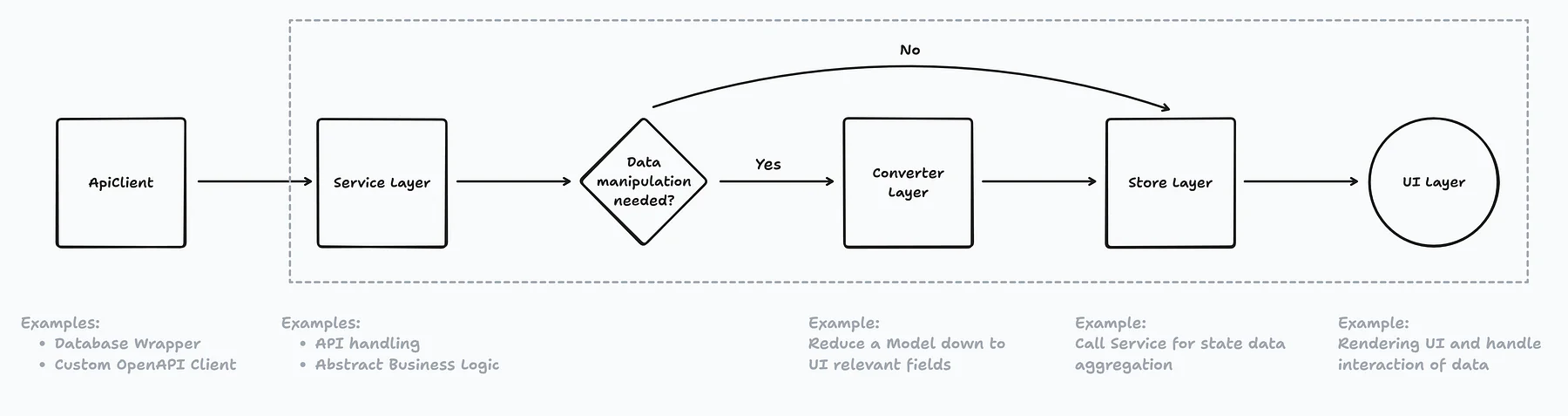
This separation creates a shared language across the team:
- UI concerns belong in components
- State orchestration concerns belong in stores/hooks/query flows
- Business rules and orchestration belong in services
- Data contract shaping belongs in converters/normalizers
As systems grow, this shared language becomes more valuable than any single implementation detail.
Service Layer - Business Logic and Orchestration
Responsibilities:
- API communication
- Retry and fallback strategies
- Caching orchestration
- Business rules
The Service layer should not know about component structure, UI concerns, or rendering behavior.
// services/ProductService.ts
import ApiClient from '@/infra/ApiClient';
import { ProductConverter } from '@/converters/product-converter';
import { ProductDTO, ProductWithInventoryDTO, RawProduct, RawInventory } from '@/types/product';
import { ProductUnavailableError, mapToProductError } from '@/services/errors';

export class ProductService {
  constructor(
    private readonly apiClient: ApiClient,
    private readonly converter: ProductConverter
  ) {}

  // The store does not need to know endpoints or raw API shapes.
  public async getProductDTO(productId: string): Promise<ProductDTO> {
    try {
      const rawProduct: RawProduct = await this.apiClient.endpoints.product.getProduct(productId);

      if (rawProduct.isDiscontinued) {
        throw new ProductUnavailableError(productId);
      }

      return this.converter.toProductDTO(rawProduct);
    } catch (error) {
      if (error instanceof ProductUnavailableError) throw error;
      throw mapToProductError(error, productId);
    }
  }

  public async getProductWithInventoryDTO(productId: string): Promise<ProductWithInventoryDTO> {
    try {
      const [rawProduct, rawInventory]: [RawProduct, RawInventory] = await Promise.all([
        this.apiClient.endpoints.product.getProduct(productId),
        this.apiClient.endpoints.inventory.getInventory(productId),
      ]);

      if (rawProduct.isDiscontinued) {
        throw new ProductUnavailableError(productId);
      }

      const product = this.converter.toProductDTO(rawProduct);
      return { ...product, inventory: rawInventory.count };
    } catch (error) {
      if (error instanceof ProductUnavailableError) throw error;
      throw mapToProductError(error, productId);
    }
  }
}
Data Normalization Layer - Stable Contracts at the Boundary
Responsibilities:
- Transform external data into internal DTOs
- Normalize inconsistent backend fields
- Validate required properties
- Expose stable contracts to the rest of the app
Many teams debate implementation details here: schema validation, mappers, parsers, runtime type guards, or generated clients. These choices evolve over time.
The principle remains stable: have one explicit boundary where external data becomes internal data.
One important distinction:
- Converter responsibility: shape and validate transport data into application contracts
- Service/domain responsibility: make business decisions and enforce business rules
Keeping that boundary clean prevents converters from becoming “mini business layers.”
// converters/ProductConverter.ts
import { ProductDTO, RawProduct } from '@/types/product';
import { ProductDataValidationError } from '@/services/errors';

export class ProductConverter {
  public toProductDTO(rawData: RawProduct): ProductDTO {
    if (!rawData?.id) {
      throw new ProductDataValidationError('Missing required field: id');
    }

    const numericPrice = Number(rawData.price);
    if (Number.isNaN(numericPrice) || numericPrice < 0) {
      throw new ProductDataValidationError('Invalid product price');
    }

    return {
      id: String(rawData.id),
      name: rawData.name ?? rawData.fullName ?? 'Untitled product',
      priceInCents: Math.round(numericPrice * 100),
      isDiscontinued: Boolean(rawData.isDiscontinued),
    };
  }
}
Store Layer – State Management and Application Flows
Responsibilities:
- Managing application state
- Exposing selectors and hooks
- Coordinating asynchronous workflows
- Providing loading and error states
The state orchestration layer interacts with Services but exposes domain-specific state to the UI.
Importantly, this does not always mean a dedicated global state library.
In modern React applications, TanStack Query, framework data APIs, or React Server Components may cover parts of this role. The underlying principle stays the same: UI components should consume prepared state, not orchestrate fetching, transformations, and business workflows themselves.
// stores/useProductStore.ts
import { create } from 'zustand';
import { ProductDTO, AsyncStatus } from '@/types/product';
import { ProductService } from '@/services/ProductService';

const toError = (value: unknown): Error =>
  value instanceof Error ? value : new Error('Unexpected error');

type State = {
  product: ProductDTO | null;
  status: AsyncStatus;
  error: Error | null;
  loadProduct: (id: string) => Promise<void>;
};

export const createProductStore = (productService: ProductService) =>
  create<State>((set) => ({
    product: null,
    status: 'idle',
    error: null,

    loadProduct: async (id: string) => {
      set({ status: 'loading', error: null });

      try {
        const dto = await productService.getProductDTO(id);
        set({ product: dto, status: 'success' });
      } catch (error) {
        set({ error: toError(error), status: 'error' });
      }
    },
  }));
UI Layer – Rendering and Interaction
Responsibilities:
- Rendering data
- Handling user interaction
- Triggering actions
- Managing local UI state
The UI should stay focused on presentation.
When components only answer “what should be displayed?” rather than “how does the system work?”, they are easier to test, reuse, and understand.
// pages/ProductPage.tsx
import React, { useEffect } from 'react';
import ApiClient from '@/infra/ApiClient';
import { ProductService } from '@/services/ProductService';
import { ProductConverter } from '@/converters/ProductConverter';
import { createProductStore } from '@/stores/useProductStore';
import ProductView from '@/components/ProductView';

// In larger apps, move this composition to a dedicated composition root.
const productService = new ProductService(new ApiClient(), new ProductConverter());
const useProductStore = createProductStore(productService);

export default function ProductPage({ productId }: { productId: string }) {
  const product = useProductStore((s) => s.product);
  const status = useProductStore((s) => s.status);
  const error = useProductStore((s) => s.error);
  const loadProduct = useProductStore((s) => s.loadProduct);

  useEffect(() => {
    void loadProduct(productId);
  }, [productId, loadProduct]);

  if (status === 'loading') return <div>Loading…</div>;
  if (status === 'error') return <div>Error: {error?.message}</div>;
  if (!product) return <div>No product found</div>;

  return <ProductView product={product} />;
}
Why this system helps
Predictable Ownership
When a bug appears, teams know where to look first:
- Rendering issue → UI
- State synchronization issue → state orchestration layer
- Business rule issue → Service
- Data contract issue → Converter
That narrows troubleshooting scope and reduces time to fix.
Reduced Coupling
- Each layer communicates through explicit contracts.
- Changes inside one layer are less likely to create unexpected side effects elsewhere.
Easier Testing
- Services can be tested independently of React.
- Converter logic can be tested with input/output assertions.
- Store flows can be tested through state transitions.
- UI tests can focus on rendering and interaction behavior.
Faster Onboarding
New team members learn faster because there is a clear answer to one recurring question: “Where should this logic live?”
| Concern | Best Home |
|---|---|
| Button click UX, local modal state | UI layer |
| Loading/error state for a workflow | Store/state orchestration |
| Retry, fallback, endpoint composition | Service layer |
Backend field mismatch (fullName vs name) | Converter layer |
| Pricing or availability rule | Service/domain layer |
| HTTP/transport details | Infrastructure + Service boundary |
Dependency Injection and Testability
Dependency Injection in frontend can be a polarizing topic. Not every app needs full constructor-based DI.
The important point is simpler: avoid hard-coupling business logic to concrete implementations when you need testability and replaceability.
Use DI where it adds clear value:
- Service testing
- Mocking APIs
- Feature-specific implementations
- Multi-tenant or environment-specific behavior
For small applications, straightforward module composition can be enough.
AI Coding Assistants Make Architecture More Important
AI-assisted development has increased implementation speed significantly. But generated code often gravitates toward large, mixed-responsibility components unless the project provides explicit guardrails.
That code can work at first and still become expensive to maintain later. This is not an AI issue. It is a human cognition issue.
Our working memory is limited: people cannot reliably reason about too many responsibilities, side effects, and data shapes at the same time. Layered architecture reduces that cognitive load by narrowing the question in front of us.
In a coding harness, when you encode architectural rules in agent instructions, skills, and review checklists, the model has clearer constraints and generates code that is easier to audit.
In practice, this creates a useful feedback loop:
- Better boundaries -> clearer prompts
- Clearer prompts -> more consistent AI output
- More consistent output -> lower review and debugging cost
Treat architecture as shared context for both people and assistants. AI can accelerate implementation, but well-defined structure is what keeps that speed sustainable over time. Developers still own the final design and production quality.
Addressing Common Objections
Isn’t this overengineering for small apps?
Sometimes yes. For prototypes and very small products, overhead may not be justified. Introduce structure when complexity starts creating friction.
Doesn’t this add boilerplate?
Some structure does add code. In growing systems, that cost is often repaid through easier debugging, safer changes, and better team coordination.
How can teams adopt it gradually?
Start with one feature. Refactor one workflow using this model. Document it as a reference. Let architecture evolve with the codebase.
What about RSC, framework loaders, or TanStack Query?
Great options. They may reduce or replace parts of a traditional store layer. The principle still applies: keep responsibilities explicit and boundaries clear.
Conclusion
Frontend architecture is not about rigid layers or ceremony.
It is about predictable ownership, explicit boundaries, and stable contracts that let teams move quickly without losing control.
Whether you use Services, Converters, Stores, React Query, framework data APIs, Server Components, or a hybrid approach, the principle remains:
- Make responsibilities obvious
- Reduce coupling
- Create clear boundaries
- Help people understand where code belongs
Start small. Refactor one feature. Document the pattern. Over time, those guardrails can transform a React codebase from a pile of components into a maintainable system that scales with both product and team.